


POS System
POS system with scale
Scales
Weighing and checkout in one go.
Software: API-OS
Place the goods, select the article, done. Weight, price and the correct tax rate appear on the receipt without anyone typing them in.
At the counter
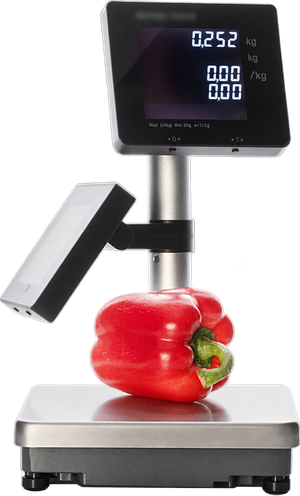
Bench scale with customer display
The scale stands next to the cash register. Cashier and customer see the same result.
At a glance
- Weight and price visible on both sides
- Tare at the touch of a button, also via barcode or QR code
- One scale, several cash registers
- Takeaway packaging sets price and tax rate
Tare, packaging and takeaway
- If the goods are already in packaging or on a plate, for example at a salad bar, the tare weight is deducted at the touch of a button.
- The tare weight can also be captured using a barcode or QR code.
- The sales channel can be linked to the packaging. With takeaway packaging, the cash register sets the price and the tax rate for takeaway.
Labels for pre-packed goods
A label printer can stand behind the scale. The article data comes from the OktoPOS Manager, the weight from the scale.
- Price and price per unit
- Quantity and shelf life
- Ingredients and additives
Several cash registers on one scale
- One scale serves several cash registers, for example in a bakery or at a fresh food counter.
- A basket with weighed articles can be completed at another cash register.
In food retail
Scanner scale in the checkout counter
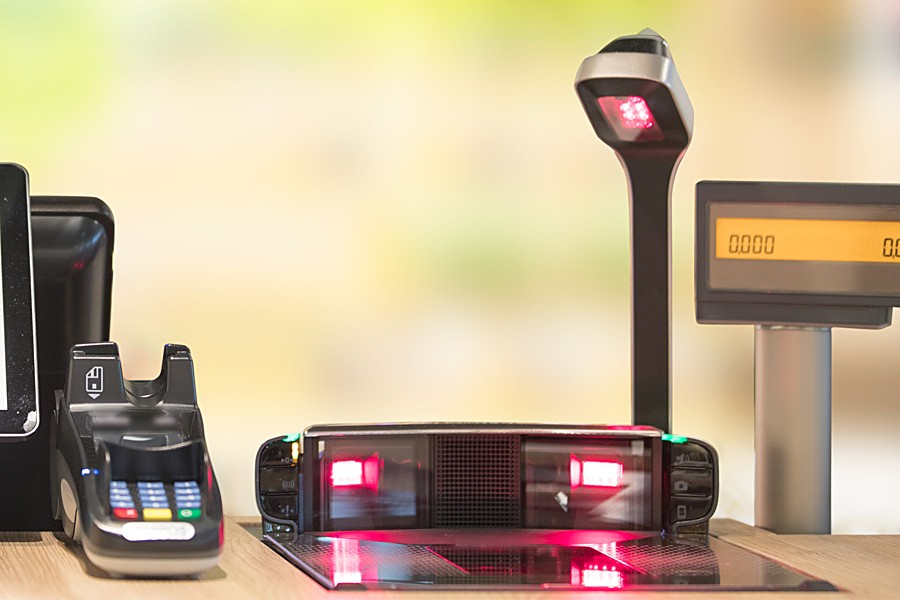
Scanner and scale sit in one housing that is let into the checkout counter from above.
At a glance
- Scanning and weighing in one step
- For supermarkets and large assortments
- From the small bench unit to the scanner scale
The built-in unit in the checkout counter
- The goods are scanned and weighed in one step.
- From the small bench unit to the scanner scale, a wide range of models is available.

Connection, acceptance and calibration authority
- The scale is connected with a USB plug.
- The scale must not be put into operation without acceptance. On the day of commissioning, acceptance by a qualified technician on site is required. The costs are invoiced to the user directly by the scale manufacturer.
- For acceptance and inspections by the calibration authority, the type plate must be attached to the cash register. You will receive the type plate from OktoPOS.
- The certificate must be available. It can be stored as a PDF on the desktop of the cash register.
- A double-sided customer display is necessary. The weighing result appears on the customer display of the cash register, the weighing process itself does not.
How the cash register and the scale work together
Certified Connection. The scale is connected to the cash register via the Dialog 06 interface. Weight and final price go from there into the open receipt.
The cash register knows the article and its price per kilogram. Weighing and calculating happen in the scale.
Where scales are in use
- Fruit and vegetable retailers
- Bakeries
- Fresh food counters
- Supermarkets
- Cafeterias
- Market stalls
- Other sales counters with articles sold by weight